
Everything You Need to Know About USB-C Hubs: A 700-Word Guide
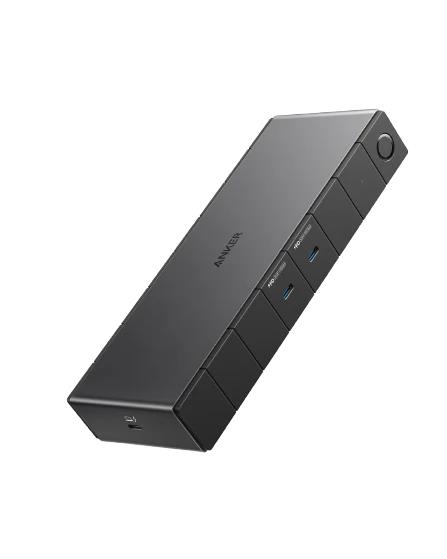
As laptops and tablets become slimmer and more compact, ports are disappearing. Many modern devices—including MacBooks, Surface tablets, Chromebooks, and even some smartphones—come equipped with only one or two USB-C ports. While this streamlines design and enhances portability, it also limits connectivity options. That’s where the USB-C hub steps in: a versatile, compact accessory that transforms a single USB-C port into a multi-functional powerhouse.
In this article, we’ll break down everything you need to know about USB-C hubs: what they are, how they work, key features to look for, and how to choose the right one for your needs.
What is a USB-C Hub?
A USB-C hub is a device that expands the capabilities of a USB-C port by providing multiple connection options. Depending on the model, a hub can include ports for USB-A (traditional USB), HDMI, SD card readers, Ethernet, audio jacks, VGA, and even power delivery (PD) passthrough for charging your device while in use.
USB-C hubs are plug-and-play, meaning they usually don’t require additional drivers or software. Once connected, they instantly allow you to attach multiple peripherals to your computer, tablet, or smartphone.
Why Do You Need a USB-C Hub?
If you use a device with limited ports—such as a MacBook Air, Surface Pro, or iPad Pro—you’ve likely encountered situations where you can’t plug in more than one accessory at a time. A USB-C hub solves this problem and more:
- Expand Port Availability: Gain access to USB-A ports, HDMI, Ethernet, SD cards, and more from a single USB-C port.
- Connect External Displays: Many hubs include HDMI or DisplayPort outputs, allowing you to connect your laptop or tablet to a monitor or TV.
- Transfer Files Easily: With SD and microSD card readers, hubs make it easy to transfer photos and videos, especially for photographers and videographers.
- Charge While You Work: USB-C hubs with PD passthrough allow you to charge your device while using other ports simultaneously.
- Improve Productivity: Connect a full-size keyboard, mouse, printer, and external drive for a full desktop setup, even from a tablet.
Key Features to Look For
Not all USB-C hubs are created equal. When choosing a hub, consider these essential features:
- Port Selection: Think about what you actually need. Do you regularly use USB-A flash drives? Do you want to connect an external monitor via HDMI? Need Ethernet for stable internet? Make sure the hub has the ports you need.
- Power Delivery (PD): If you want to charge your device while using the hub, look for one that supports USB-C PD passthrough, ideally at 60W or higher depending on your device’s requirements.
- Data Transfer Speed: USB-C hubs vary in data speed. Look for USB 3.0 or USB 3.1 ports for faster file transfers. Some newer hubs even support USB 3.2 or Thunderbolt 3/4 for high-speed data and display outputs.
- Build Quality: A solid aluminum or high-grade plastic casing helps with heat dissipation and durability, especially if you travel frequently or use it daily.
- Compatibility: Make sure the hub is compatible with your specific device. Some features (like video output) may not work on all devices, especially smartphones or lower-end tablets.
Types of USB-C Hubs
There are several categories of USB-C hubs tailored to different use cases:
- Basic Hubs: Include a few USB-A ports and maybe an HDMI. Ideal for light users who need to plug in peripherals.
- Multiport Hubs: Offer HDMI, USB-A, SD card readers, Ethernet, and USB-C PD. These are best for power users and digital professionals.
- Docking Stations: These are larger, more powerful hubs that can support dual monitors, multiple USB ports, audio jacks, and high-wattage charging. They’re great for a permanent desk setup.
- Portable Hubs: Compact and lightweight with essential ports. Perfect for travel or on-the-go professionals.
Tips for Using a USB-C Hub
- Avoid Overloading: Cheaper hubs can overheat or malfunction when too many devices are connected at once. Invest in a quality model with good reviews.
- Check Power Supply Needs: If you’re running multiple high-power devices, make sure your USB-C hub is powered externally or has sufficient PD passthrough.
- Keep Firmware Updated: Some premium USB-C hubs allow firmware updates to improve compatibility and performance—check the manufacturer’s website.
Conclusion
A USB-C hub is an indispensable accessory in today’s minimalist tech world. It bridges the gap between sleek modern design and everyday practicality, letting you connect multiple devices, transfer data, and even expand your display capabilities with ease. Whether you’re a student, creative professional, or business traveler, the right USB-C hub can drastically improve your productivity and workflow.
When choosing a USB-C hub, always consider your unique needs, prioritize quality, and ensure compatibility with your device. With the right hub in your tech arsenal, you can turn a single port into a fully functional workstation—no compromises required.