
Power Bank for Laptop: The Ultimate Guide to Portable Charging
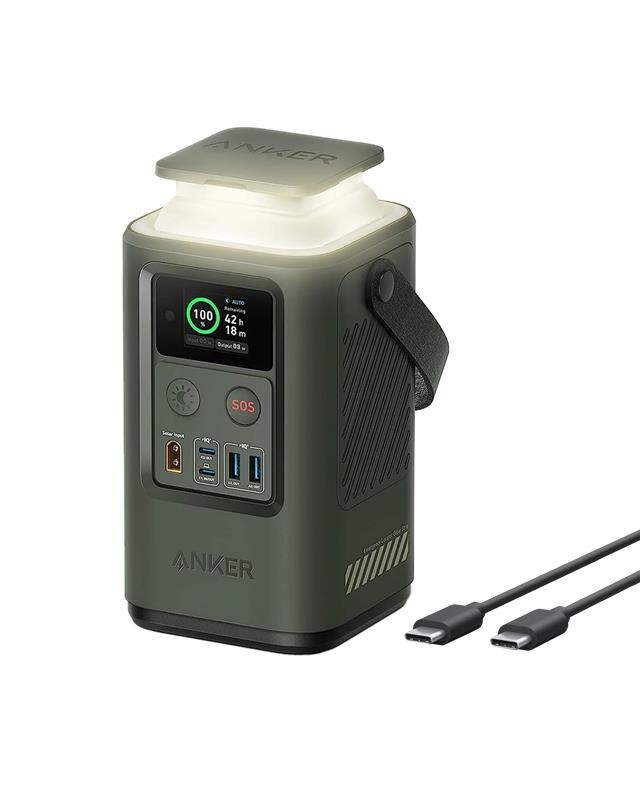 In an era where mobility and flexibility are essential, running out of battery on your laptop can be a major inconvenience—especially when you’re away from an outlet. That’s where a power bank for laptop becomes a true lifesaver. Unlike standard phone power banks, laptop power banks are designed to deliver higher output, offer greater capacity, and charge your laptop efficiently while on the go.
Whether you’re a frequent traveler, remote worker, student, or creative professional, investing in a good laptop power bank can greatly enhance your productivity and peace of mind. In this guide, we’ll explore what laptop power banks are, how they work, the key features to look for, and how to pick the best one for your needs.
What Is a Laptop Power Bank?
A laptop power bank is a portable external battery designed specifically to charge laptops and other high-power devices. These power banks are larger and more powerful than typical phone chargers, as they need to support higher voltage and wattage output.
They are often equipped with USB-C Power Delivery (PD) ports or DC output ports, depending on the laptop’s charging requirements. Many modern laptops, including MacBooks, Dell XPS, Lenovo ThinkPads, and Microsoft Surface devices, can be charged via USB-C PD, making laptop power banks more versatile than ever before.
Why You Need a Laptop Power Bank
A laptop power bank is not just a luxury—it can be a necessity depending on your lifestyle:
- Travel: Stay productive on long flights, train rides, or road trips.
- Remote work: Work from parks, cafes, or coworking spaces without relying on power outlets.
- Emergencies: Keep your laptop powered during outages or in off-grid locations.
- Creativity on the go: For photographers, videographers, and designers, a portable power source can keep editing sessions uninterrupted.
Key Features to Consider
When shopping for a laptop power bank, there are several important factors to keep in mind:
- Battery Capacity
Capacity is measured in mAh (milliamp hours) or Wh (watt hours). For laptops, a good power bank usually starts at 20,000mAh or 70Wh. Higher capacity models (25,000–50,000mAh) can deliver one to two full laptop charges, depending on your device.
- Power Output
Power output is crucial for laptop charging. Look for:
- USB-C PD (Power Delivery): Offers 30W to 100W output, suitable for modern USB-C laptops.
- DC Output: Some older laptops require barrel plug adapters; choose a power bank with adjustable voltage settings and multiple tips.
- AC Outlet: Some high-end power banks even include AC sockets for full-sized laptop chargers or other electronics.
- Compatibility
Always check your laptop’s power requirements (usually printed on the original charger). Match the output voltage (e.g., 5V, 9V, 15V, 20V) and wattage to ensure compatibility.
- Port Selection
More ports mean more versatility. Look for a combination of:
- USB-C PD ports (for laptops, phones, and tablets)
- USB-A ports (for smaller devices)
- DC ports (for specific laptop brands or older models)
- Size and Portability
Larger capacity usually means more bulk. If you’re always on the move, balance portability with performance. For example, a 100Wh power bank is TSA-approved for air travel and can still provide significant backup power.
- Pass-Through Charging
This allows you to charge the power bank while it simultaneously charges your laptop—ideal for managing multiple devices efficiently.
Top Brands and Models
Some of the most reputable laptop power bank brands include:
- Anker – Known for quality and reliability. The Anker 737 Power Bank offers 24,000mAh capacity and 140W output.
- Omnicharge – The Omni 20+ includes USB-C PD, AC output, and an OLED screen for monitoring usage.
- Baseus – Affordable and efficient, often offering 65W PD charging in compact designs.
- Zendure – Rugged and stylish, with high-capacity models and wide compatibility.
- MAXOAK – High-capacity DC output power banks with support for many laptop brands.
Laptop Charging Tips
To get the most from your power bank:
- Charge before you go: Fully charge your power bank at home before travel.
- Use efficient cables: Poor-quality or incompatible cables can reduce charging speed or cause overheating.
- Avoid zero battery: Don’t let your laptop battery drop to 0%—start charging around 20–30% for better battery health.
- Check for firmware updates: Some premium power banks support updates to improve performance and compatibility.
Air Travel Considerations
Most airlines allow power banks under 100Wh (27,000mAh) in carry-on luggage. Power banks over 100Wh but under 160Wh may require airline approval. Power banks are not allowed in checked baggage.
Conclusion
A power bank for your laptop is a smart investment in today’s mobile-first world. It offers freedom, flexibility, and peace of mind—allowing you to work, create, or stay connected from anywhere. With a wide range of models available to suit every need and budget, choosing the right one comes down to understanding your device’s power requirements, your usage habits, and how portable you need the charger to be.
Whether you’re jet-setting around the world or working from a local coffee shop, a reliable laptop power bank ensures your productivity never runs out of charge.